Conclusion
Hmmm… The two courses, HTML5 Part 1 and HTML5 Part 2, have covered a lot of material, and you may have trouble identifying which of the different techniques you have learned best suits your needs.
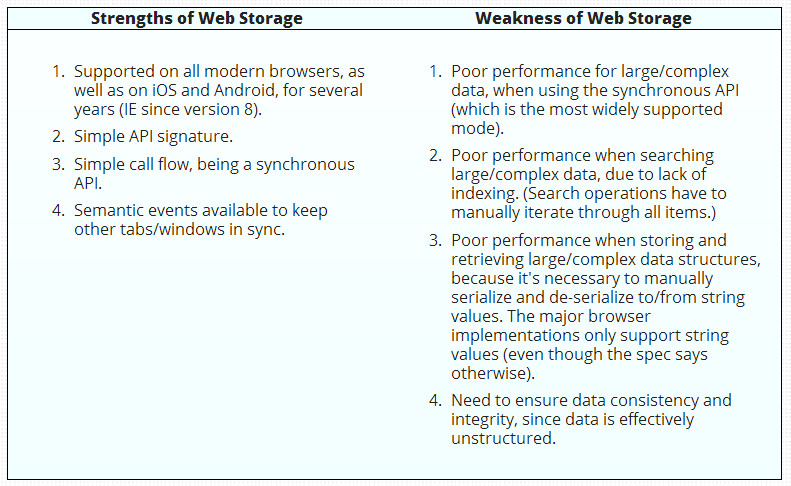
We have borrowed two tables from HTML5Rocks.com that summarize the pros and cons of various approaches.
To sum up:
- If you need to work with transactions (in the database sense: protect data against concurrent access, etc.), or do some searches on a large amount of data, if you need indexes, etc., then use IndexedDB
- If you need a way to store simple strings or JSON objects, then use localStorage/sessionStorage. Example: store HTML form content as you type, store a game’s hi-scores, preferences of an application, etc.
- If you need to cache files for faster access or for making your application run offline, then use the cache API. This is true for today, but in future, look for the Service Workers API. This topic will be presented in future versions of this course, once browser support has improved and the API has stabilized.
- If you need to manipulate files (read or download/upload), then use the File API and XHR2.
- If you need to manipulate a file system, there is a FileSystem and a FileWriter API which are very poorly supported and will certainly be replaced in HTML 5.1. We decided not to discuss these in the course because they lack agreement within the community and browser vendors.
- If you need an SQL database client-side: No! Forget this idea, please! There was once a WebSQL API, but it disappeared rapidly.
Note that the above points may be used in any combination: you may have a Web app that uses localStorage and IndexedDB to cache its resources so that it can run in offline mode.
Web Storage
IndexedDB

 HTML game