Using IndexedDB: modifying data from an object store
We used request.add(object) to add a new customer and request.delete(keypath) to remove a customer. Now, we will use request.put(keypath) to update a customer!
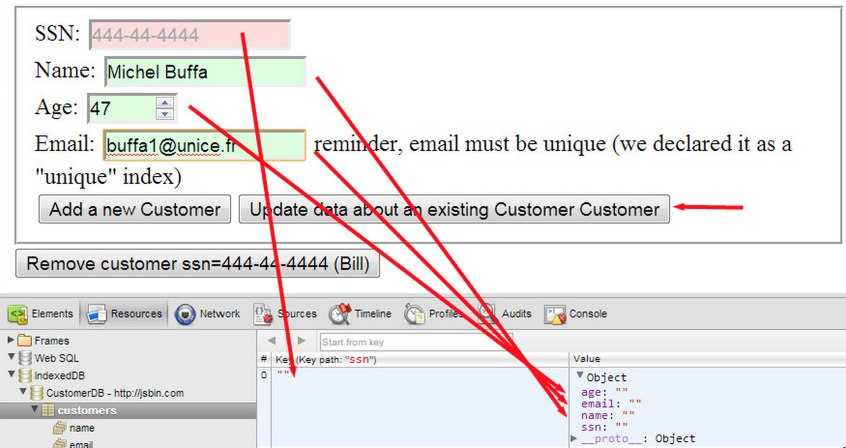
The above screenshot shows how we added an empty customer with ssn=””, (we just clicked on the open database button, then on the “add a new customer button” with an empty form).
Now, we fill the name, age and email input fields to update the object with ssn=”” and click on the “update data about an existing customer” button. This updates the data in the object store, as shown in this screenshot:

Here is the new code added to our example:
- function updateACustomer() {
- if(db === null) {
- alert(‘Database must be opened first, please click the Create
- CustomerDB Database first’);
- return;
- }
- var transaction = db.transaction([“customers”], “readwrite”);
- // Do something when all the data is added to the database.
- transaction.oncomplete = function(event) {
- console.log(“All done!”);
- };
- transaction.onerror = function(event) {
- console.log(“transaction.onerror errcode=” + event.target.error.name);
- };
- var objectStore = transaction.objectStore(“customers”);
- var customerToUpdate={};
- customerToUpdate.ssn = document.querySelector(“#ssn”).value;
- customerToUpdate.name = document.querySelector(“#name”).value;
- customerToUpdate.age = document.querySelector(“#age”).value;
- customerToUpdate.email = document.querySelector(“#email”).value;
- alert(‘updating customer ssn=’ + customerToUpdate.ssn);
- var request = objectStore.put(customerToUpdate);
- request.onsuccess = function(event) {
- console.log(“Customer updated.”);
- };
- request.onerror = function(event) {
- alert(“request.onerror, could not update customer, errcode= “ +
- event.target.error.name + “. The ssn is not in the
- Database”);
- };
- }
The update occurs at line 28.
 HTML game