Using IndexedDB: inserting data in an object store
Example 1: basic steps
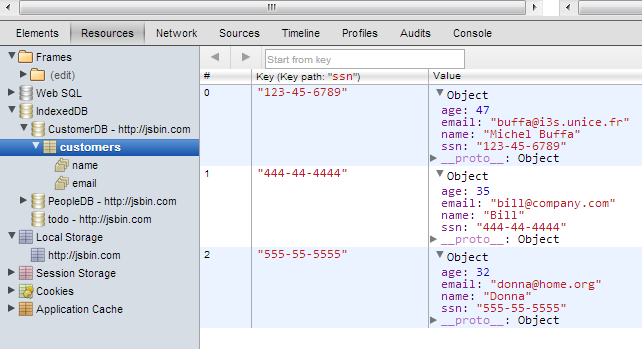
Execute this example and look at the IndexedDB object store content from the Chrome dev tools (F12 or cmd-alt-i). One more customer should have been added.
Be sure to click on the “create database” button before clicking the “insert new customer” button.
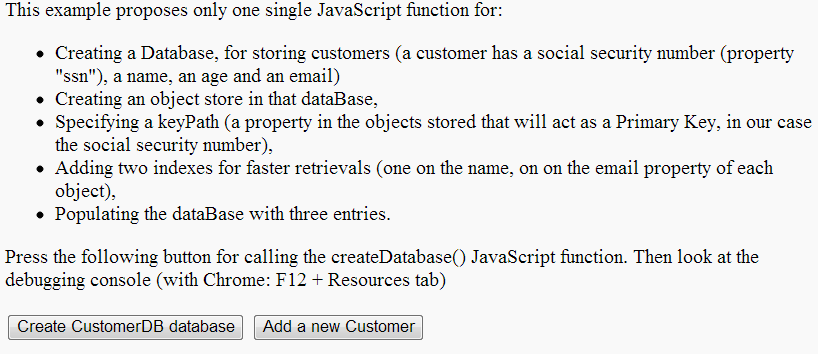
The next screenshot shows the IndexedDB object store in Chrome dev. tools (use the “Resources” tab). Clicking the “Create CustomerDB” database creates or opens the database, and clicking “Add a new Customer” button adds a customer named “Michel Buffa” into the object store:
Code from the example, explanations:
We just added a single function into the example from the previous section – the function AddACustomer() that adds one customer:
- { ssn: “123-45-6789”, name: “Michel Buffa”, age: 47, email: “buffa@i3s.unice.fr” }
Here is the complete source code of the addACustomer function:
- function addACustomer() {
- // 1 – get a transaction on the “customers” object store
- // in readwrite, as we are going to insert a new object
- var transaction = db.transaction([“customers”], “readwrite”);
- // Do something when all the data is added to the database.
- // This callback is called after transaction has been completely
- // executed (committed)
- transaction.oncomplete = function(event) {
- alert(“All done!”);
- };
- // This callback is called in case of error (rollback)
- transaction.onerror = function(event) {
- console.log(“transaction.onerror errcode=” + event.target.error.name);
- };
- // 2 – Init the transaction on the objectStore
- var objectStore = transaction.objectStore(“customers”);
- // 3 – Get a request from the transaction for adding a new object
- var request = objectStore.add({ ssn: “123-45-6789”,
- name: “Michel Buffa”,
- age: 47,
- email: “buffa@i3s.unice.fr” });
- // The insertion was ok
- request.onsuccess = function(event) {
- console.log(“Customer with ssn= “ + event.target.result + “
- added.”);
- };
- // the insertion led to an error (object already in the store,
- // for example)
- request.onerror = function(event) {
- console.log(“request.onerror, could not insert customer,
- errcode = “ + event.target.error.name);
- };
- }
Explanations:
In the code above, lines 4, 19 and 22 show the main calls you have to perform in order to add a new object to the store:
- Create a transaction.
- Map the transaction onto the object store.
- Create an “add” request that will take part in the transaction.
The different callbacks are in lines 9 and 14 for the transaction, and in lines 28 and 35 for the request.
You may have several requests for the same transaction. Once all requests have finished, the transaction.oncomplete callback is called. In any other case the transaction.onerror callback is called, and the datastore remains unchanged.
Here is the trace from the dev tools console:

Example 2: adding a form and validating inputs
Online example available at JSBin:
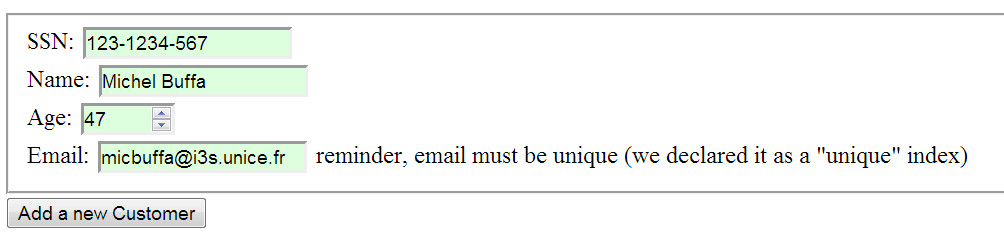
You can try this example by following these steps:
- Press first the “Create database” button
- then add a new customer using the form
- click the “add a new Customer” button
- then press F12 or cmd-alt-i to use the Chrome dev tools and inspect the IndexedDB store content. Sometimes it is necessary to refresh the view (right click on IndexedDB/refresh), and sometimes it is necessary to close/open the dev. tools to have a view that shows the changes (press F12 or cmd-alt-i twice). Chrome dev. tools are a bit strange from time to time.
This time, we added some tests for checking that the database is open before trying to insert an element, and we added a small form for entering a new customer.
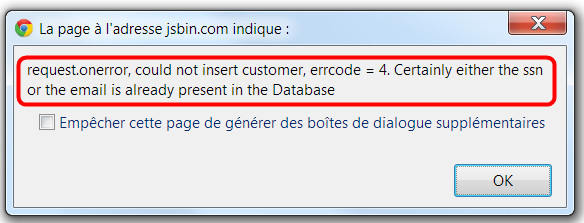
Notice that the insert will fail and display an alert with an error message if:
- The ssn is already present in the database. This property has been declared as the keyPath (a sort of primary key) in the object store schema, and it should be unique: db.createObjectStore(“customers”, { keyPath: “ssn” });
- The email address is already present in the object store. Remember that in our schema, the email property is an index that we declared as unique: objectStore.createIndex(“email”, “email”, { unique: true });
- Try to insert the same customer twice, or different customers with the same ssn. An alert like this should pop up:
Here is the updated version of the HTML code of this example:
- <fieldset>
- SSN: <input type=“text” id=“ssn” placeholder=“444-44-4444”
- required/><br>
- Name: <input type=“text” id=“name”/><br>
- Age: <input type=“number” id=“age” min=“1” max=“100”/><br>
- Email:<input type=“email” id=“email”/> reminder, email must be
- unique (we declared it as a “unique” index)<br>
- </fieldset>
- <button onclick=“addACustomer();“>Add a new Customer</button>
And here is the new version of the addACustomer() JavaScript function:
- function addACustomer() {
- if(db === null) {
- alert(‘Database must be opened, please click the Create
- CustomerDB Database first’);
- return;
- }
- var transaction = db.transaction([“customers”], “readwrite”);
- // Do something when all the data is added to the database.
- transaction.oncomplete = function(event) {
- console.log(“All done!”);
- };
- transaction.onerror = function(event) {
- console.log(“transaction.onerror errcode=” + event.target.error.name);
- };
- var objectStore = transaction.objectStore(“customers”);
- // adds the customer data
- var newCustomer={};
- newCustomer.ssn = document.querySelector(“#ssn”).value;
- newCustomer.name = document.querySelector(“#name”).value;
- newCustomer.age = document.querySelector(“#age”).value;
- newCustomer.email = document.querySelector(“#email”).value;
- alert(‘adding customer ssn=’ + newCustomer.ssn);
- var request = objectStore.add(newCustomer);
- request.onsuccess = function(event) {
- console.log(“Customer with ssn= “ + event.target.result + “
- added.”);
- };
- request.onerror = function(event) {
- alert(“request.onerror, could not insert customer, errcode = “
- + event.target.error.name +
- “. Certainly either the ssn or the email is already
- present in the Database”);
- };
- }
It is also possible to shorten the code of the above function by chaining the different operations using the “.” operator (getting a transaction from the db, opening the store, adding a new customer, etc.).
Here is the short version:
- var request = db.transaction([“customers”], “readwrite”)
- .objectStore(“customers”)
- .add(newCustomer);
The above code does not perform all the tests, but you may encounter such a way of coding (!).
Also, note that it works if you try to insert empty data:
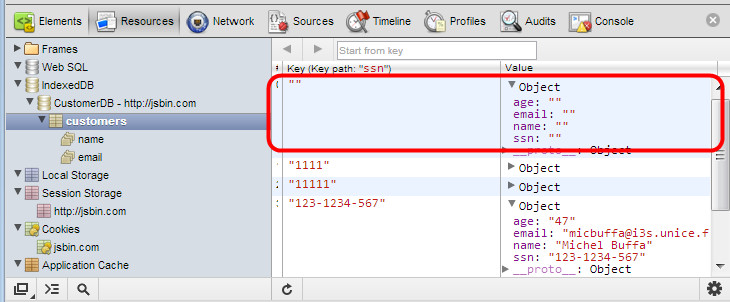
Indeed, entering an empty value for the keyPath or for indexes is a valid value (in the IndexedDB sense). In order to avoid this, you should add more JavaScript code. We will let you do this as an exercise.
Previous
 HTML game