Introduction
This section presents the Device Motion API which is used in a similar manner to the device orientation API discussed earlier.
The deviceMotion API deals with accelerations instead of orientation only.
Use cases proposed by the specification are:
- Controlling a game: a gaming Web application monitors the device’s orientation and interprets tilting in a certain direction as a means to control an on-screen sprite.
- Gesture recognition: a Web application monitors the device’s acceleration and applies signal processing in order to recognize certain specific gestures. For example, using a shaking gesture to clear a web form.
- Mapping: a mapping Web application uses the device’s orientation to correctly align the map with reality.
Basic Usage
- function handleMotionEvent(event) {
- var x = event.accelerationIncludingGravity.x;
- var y = event.accelerationIncludingGravity.y;
- var z = event.accelerationIncludingGravity.z;
- // Process …
- }
- window.addEventListener(“devicemotion”, handleMotionEvent, true);
Basics about acceleration
The deviceMotion API is rather straightforward and is very similar to the orientation API except that it returns more than just the rotationinformation, it also returns acceleration information reflecting the device’s actual movement.
The acceleration is in three parts:
- along the X axis
- along the Y axis
- along the Z axis
Each value is measured in meters per second squared (m/s2) – multiply by 3.281 if you’d prefer an approximation in feet per second per second.
The acceleration is returned by the API as an acceleration event. The two pertinent properties are: accelerationIncludingGravity and acceleration. The latter excludes the effects of gravity.
Why are there two different values? Because some devices have the capability of excluding the effects of gravity, eg if equipped with a gyroscope. Indeed there is acceleration due implicitly to gravity, see also this: Acceleration of Gravity on Earth…
If the device doesn’t have a gyroscope, the acceleration property will be returned as null. In this case, you have no choice but to use the accelerationIncludingGravity property. Note that all IOS devices, so far, are equipped with a gyroscope.
So, the device motion event is a superset of the device orientation event; it returns rotation as well as acceleration information from the device.
Example of acceleration values
If a laptop is in its normal position with the screen facing up, the data returned would be (info taken from:http://www.html5rocks.com/en/tutorials/device/orientation):

A mobile phone rotated along the x-axis so the screen is perpendicular to its normal position would return:

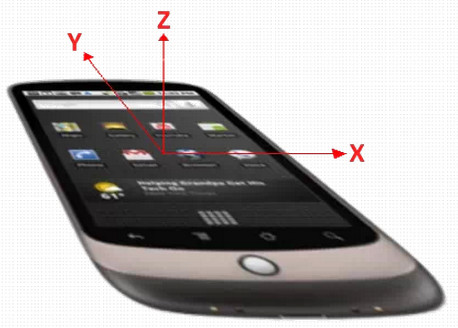
Remember the coordinate system for a mobile phone:
Common steps
The principles arethe same as for the orientation API:
- Test if the API is supported by the browser,
- Add a listener for ‘devicemotion‘ events,
- Get the acceleration values from the DOM event that has been passed to the listener,
- Process the data.
Common processing with acceleration values
Test the value of the acceleration.z property: If > 0 then the device is facing up, otherwise it is facing down. This would be useful if you wanted to play heads or tails with your phone 😉
- // For example, if acceleration.z is > 0 then the phone is facing up
- var facingUp = –1;
- if (acceleration.z > 0) {
- facingUp = +1;
- }
Compute the angle corresponding to the Left / Right and Front / Back tilts. This example was taken from http://www.html5rocks.com/en/tutorials/device/orientation and uses the accelerationIncludingGravity property of the event.
- function deviceMotionHandler(eventData) {
- // Grab the acceleration including gravity from the results
- var acceleration = eventData.accelerationIncludingGravity;
- // Convert the value from acceleration to degrees
- // acceleration.x|y is the acceleration according
- // to gravity, we’ll assume we’re on Earth and divide
- // by 9.81 (earth gravity) to get a percentage value,
- // and then multiply that by 90 to convert to degrees.
- var tiltLR = Math.round(((acceleration.x) / 9.81) * –90);
- var tiltFB = Math.round(((acceleration.y + 9.81) / 9.81) * 90 * facingUp);
- // … do something
- }
Compute the vertical (direction of the sky) – this extract comes from a complete example further down this page…
- …
- var angle = Math.atan2(accel.y,accel.x);
- var canvas = document.getElementById(‘myCanvas’);
- var ctx = canvas.getContext(‘2d’);
- ctx.moveTo(50,50);
- // Draw sky direction in the canvas
- ctx.lineTo(50–50*Math.cos(angle),50+50*Math.sin(angle));
- ctx.stroke();
Use acceleration values to move a ball on the screen of a tablet when the tablet is tilted front / back or left / right (complete example later on)…
- …
- ball.x += acceleration.x;
- ball.y += acceleration.y;
- …
Complete examples
Move the HTML5 logo
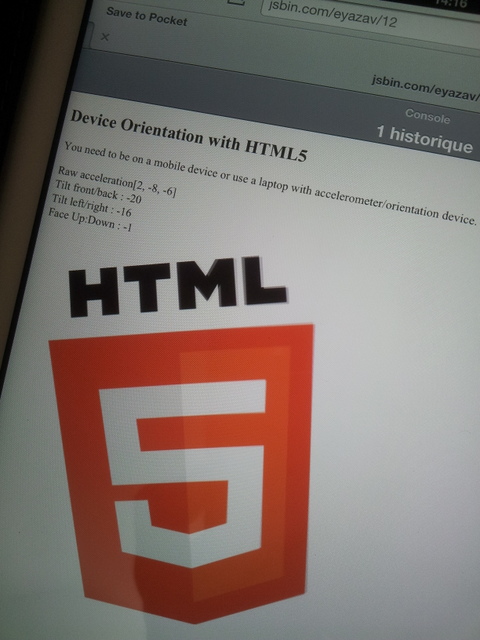
Code from this example:
- <!doctype html>
- <html>
- <head></head>
- <body>
- <h2>Device Orientation with HTML5</h2>
- You need to be on a mobile device or use a laptop with accelerometer/orientation
- device.
- <p>
- id=“rawAccel”>
- id=“tiltFB”>
- id=“tiltLR”>
- id=“upDown”>
- <img src=“http://www.html5rocks.com/en/tutorials/device/orientation/html5_logo.png” id=“imgLogo”class=“logo”>
- type=“text/javascript”>
- if (window.DeviceMotionEvent != undefined) {
- console.log(“DeviceMotion is supported”);
- window.addEventListener(‘devicemotion’, function(eventData) {
- // Grab the acceleration including gravity from the results
- var acceleration = eventData.accelerationIncludingGravity;
- // Display the raw acceleration data
- var rawAcceleration = “[“ + Math.round(acceleration.x) + “, “ + Math.round(acceleration.y)
- + “, “ + Math.round(acceleration.z) + “]”;
- // Z is the acceleration in the Z axis, and if the device
- // is facing up or down
- var facingUp = –1;
- if (acceleration.z > 0) {
- facingUp = +1;
- }
- // Convert the value from acceleration to degrees
- // acceleration.x|y is the acceleration according to gravity,
- // we’ll assume we’re on Earth and divide
- // by 9.81 (earth gravity) to get a percentage value,
- // and then multiply that by 90 to convert to degrees.
- var tiltLR = Math.round(((acceleration.x) / 9.81) * –90);
- var tiltFB = Math.round(((acceleration.y + 9.81) / 9.81) * 90 * facingUp);
- document.querySelector(“#rawAccel”).innerHTML =
- “Raw acceleration” + rawAcceleration;
- document.querySelector(“#tiltFB”).innerHTML =
- “Tilt front/back : “ + tiltFB;
- document.querySelector(“#tiltLR”).innerHTML =
- “Tilt left/right : “ + tiltLR;
- document.querySelector(“#upDown”).innerHTML =
- “Face Up:Down : “ + facingUp;
- updateLogoOrientation(tiltLR, tiltFB);
- }, false);
- } else {
- alert(“Not supported on your device or browser. Sorry.”);
- }
- function updateLogoOrientation(tiltLR, tiltFB) {
- // USE CSS3 rotations for rotating the HTML5 logo
- //for webkit browser
- document.getElementById(“imgLogo”).style.webkitTransform =
- “rotate(“ + tiltLR + “deg) rotate3d(1,0,0, “ + (tiltFB * –1) + “deg)”;
- //for HTML5 standard-compliance
- document.getElementById(“imgLogo”).style.transform =
- “rotate(“ + tiltLR + “deg) rotate3d(1,0,0, “ + (tiltFB * –1) + “deg)”;
- }
- </body>
- </html>
Interesting example that uses jQuery mobile
This example comes from: http://www.emanueleferonato.com/2011/09/05/playing-with-javascript-iphone-and-devicemotion-event-listener/
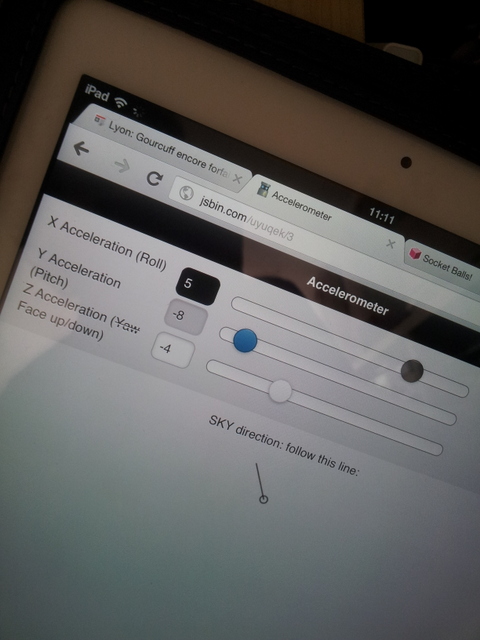
It shows how the X and Y acceleration values can be used for indicating the sky’s direction (vertical), and how the Z acceleration is, in fact, an indicator for the face up / face down orientation of the device.
This example has been adapted and put on jsbin.com so that you can tweak it: https://jsbin.com/uyuqek/4/edit
- <html>
- <head>
- <meta http-equiv=“content-type” content=“text/html; charset=utf-8”>
- <meta name=“viewport” content=“user-scalable=no, width=device-width” />
- <link rel=“stylesheet”
- href=“http://code.jquery.com/mobile/1.0b2/jquery.mobile-1.0b2.min.css” />
- type=“text/javascript”
- src = “http://code.jquery.com/jquery-1.6.2.min.js”>
- type=“text/javascript”
- src = “http://code.jquery.com/mobile/1.0b2/jquery.mobile-1.0b2.min.js”>
- type=“text/javascript”>
- $(document).ready(function(){
- window.addEventListener(“devicemotion”,onDeviceMotion,false);
- });
- function onDeviceMotion(event){
- var ctx = document.getElementById(“c”).getContext(“2d”);
- var accel = event.accelerationIncludingGravity;
- $(“#sliderX”).val(Math.round(accel.x)).slider(“refresh”);
- $(“#sliderY”).val(Math.round(accel.y)).slider(“refresh”);
- $(“#sliderZ”).val(Math.round(accel.z)).slider(“refresh”);
- // sky direction
- var angle = Math.atan2(accel.y,accel.x)
- ctx.clearRect(0,0,100,100);
- ctx.beginPath();
- ctx.arc(50,50,5,0,2*Math.PI,false);
- ctx.moveTo(50,50);
- // Draw sky direction
- ctx.lineTo(50–50*Math.cos(angle),50+50*Math.sin(angle));
- ctx.stroke();
- }
- </head>
- <body>
- data-role=“page” id = “intropage”>data-role=“header”>
- Accelerometer
data-role=“content”>- for=“sliderX”>X Acceleration (Roll)
- type=“range” name=“sliderX” id=“sliderX”
- value=“0” min=“-10” max=“10” data-theme=“a” />
- for=“sliderY”>Y Acceleration (Pitch)
- type=“range” name=“sliderY” id=“sliderY”
- value=“0” min=“-10” max=“10” data-theme=“b” />
- for=“sliderZ”>Z Acceleration (
Yaw- Face up/down)
- type=“range” name=“sliderZ” id=“sliderZ”
- value=“0” min=“-10” max=“10” data-theme=“c” />
- <p style = “text–align:center“>SKY direction:
- follow this line:</p>
style = “text–align:center;margin–top:10px;“>- id=“c” width=“100” height=“100”>
- </div>
- </body>
- </html>
Move a ball on the screen
Try this example at JsBin. If using a mobile device, use this URL instead!
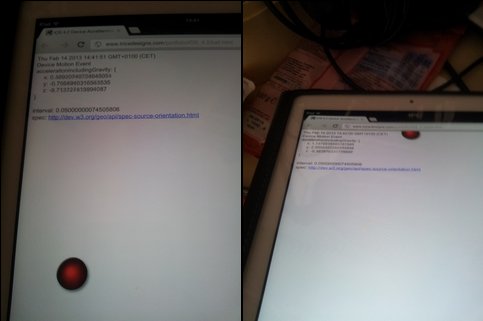
Code from this example:
- <!DOCTYPE html PUBLIC “-//W3C//DTD XHTML 1.0 Transitional//EN” “http://www.w3.org/TR/xhtml1/DTD/xhtml1-transitional.dtd”>
- <html xmlns=“http://www.w3.org/1999/xhtml”>
- <head>
- <meta http-equiv=“Content-Type” content=“text/html; charset=UTF-8” />
- <meta name=“viewport” content=“width=device-width,
- target-densityDpi=device-dpi,
- initial-scale=1.0,
- user-scalable=no,
- maximum-scale=1.0″>
- <title>iOS 4.2 Device Accellerometer</title>
- <style>
- body {
- font–family:Arial, Helvetica, sans–serif;
- font–size: 14px;
- }
- #board {
- position:absolute;
- left:0px;
- right:0px;
- top:0px;
- bottom:0px;
- }
- #ball {
- position:absolute;
- width: 60px;
- height: 60px;
- border–radius: 30px;
- background–image: –webkit–gradient(radial, 45% 45%, 5, 60% 60%,
- 40, from(red), color–stop(75%, black), to(rgba(255, 255, 255, 0)));
- –webkit–box–shadow: 3px 3px 5px #888;
- }
- </style>
- src=“http://ajax.googleapis.com/ajax/libs/jquery/1.4.2/jquery.min.js”>
- !window.jQuery && document.write(”)
- var offset;
- var velocity;
- var board;
- var ball;
- var interval;
- $(document).ready(function() {
- window.addEventListener(“devicemotion”, onDeviceMotion, false);
- $(‘#timestamp’).html(new Date().toString());
- $(‘#status’).html(“Ready!”);
- velocity = {};
- velocity.x = 0;
- velocity.y = 0;
- offset = {};
- board = $(‘#board’);
- ball = $(‘#ball’);
- offset.left = (board.width() – ball.width()) / 2;
- offset.top = (board.height() – ball.height()) / 2;
- $(‘#ball’).offset(offset);
- interval = setInterval(updateBall, 25);
- });
- function onDeviceMotion(event) {
- $(‘#timestamp’).html(new Date().toString());
- $(‘#status’).html(“Device Motion Event”);
- var eventDetails;
- try {
- var accel = event.accelerationIncludingGravity;
- eventDetails = “accelerationIncludingGravity: {“ +
- “
x: “ + accel.x + - “
y: “ + accel.y + - “
z: “ + accel.z + - “
}
“ + - “interval: “ + event.interval;
- updateVelocity(event);
- } catch (e) {
- eventDetails = e.toString();
- }
- $(‘#details’).html(eventDetails);
- }
- var decay = .9;
- var bounceDecay = .95;
- var maxVelocity = 100;
- function updateVelocity(event) {
- velocity.x += event.accelerationIncludingGravity.x;
- if (Math.abs(velocity.x) > maxVelocity) {
- if (velocity.x > 0) velocity.x = maxVelocity;
- else velocity.x = –maxVelocity;
- }
- velocity.y += event.accelerationIncludingGravity.y;
- if (Math.abs(velocity.y) > maxVelocity) {
- if (velocity.y > 0) velocity.y = maxVelocity;
- else velocity.y = –maxVelocity;
- }
- }
- function updateBall() {
- if (offset.left -(ball.width() / 2)) {
- velocity.x = Math.abs(velocity.x * bounceDecay);
- } else if (offset.left >= (board.width() – (ball.width() / 2))) {
- velocity.x = –Math.abs(velocity.x * bounceDecay);
- } else {
- velocity.x = parseInt(velocity.x);
- velocity.x *= decay;
- }
- if (offset.top -(ball.height() / 2)) {
- velocity.y = –Math.abs(velocity.y * bounceDecay);
- } else if (offset.top >= (board.height() – (ball.height() / 2))) {
- velocity.y = Math.abs(velocity.y * bounceDecay);
- } else {
- velocity.y = parseInt(velocity.y);
- velocity.y *= decay;
- }
- offset.left += velocity.x;
- offset.top -= velocity.y;
- $(‘#ball’).offset(offset);
- }
- </head>
- <body>
- id=“timestamp”>
- id=“status”>
- id=“details”>
- id=“board”>id=“ball”>
- </div>spec: <a href=“http://dev.w3.org/geo/api/spec-source-orientation.html”target=“http://dev.w3.org/geo/api/spec-source-orientation.html”>http://dev.w3.org/geo/api/spec-source-orientation.html</a>
- </body>
- </html>
External resources:
 HTML game
