HTML templates
HTML templates are an important building-block of Web components. When you use a custom element like <x-gif….>, the browser will (before rendering the document) clone and add some HTML/CSS/JS code to your document, thanks to the HTML template API that is used behind the scenes.
HTML templates define fragments of code (HTML, JavaScript and CSS styles) that can be reused.
These parts of code are inert (i.e., CSS will not be applied, JavaScript will not be executed, images will not be loaded, videos will not be played, etc.) until the template is used.
Here is an example of code that defines a template:
- <template id=“mytemplate”>
- <img src=“” alt=“great image”>
- class=“comment”>
- </template>
Note that it’s ok to have the src attribute empty here, we will initialize it when the template is activated.
To use a template, clone its content!
A template has “content” (the lines of code between <template> and </template>), and to manipulate it we use the DOM API and the content attribute of the DOM node that corresponds to a given template (line 3 of the source code example below).
In order to use a template’s content, we clone it using the document.importNode(templateContent, true) method, where the node is the template’s content and true means “deep copy” the content.
A template is typically used like this:
- var t = document.querySelector(‘#mytemplate’);
- // Populate the src at runtime.
- t.content.querySelector(‘img’).src = ‘http://webcomponents.github.io/img/logo.svg’;
- // Clone the template, sort of “instantiation”!
- var clone = document.importNode(t.content, true);
- document.body.appendChild(clone);
Explanations:
- In this example, line 1 assigns the DOM node corresponding to the template we defined to variable t.
- t.content (line 3) is the root of the subtree in the template (in other words, the lines of HTML code inside the template element)
- Note that we set the value of the src attribute of the image inside the template at line 3, using a CSS selector on the template’s content.
- Lines 5 and 6 clone the template’s content and add it to the <body> of the document.
Online Example
Here is an online example at JSBin that uses exactly the code presented:
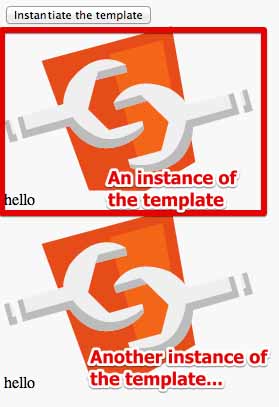
And here is the complete source code…
The HTML part:
- <template id=“mytemplate”>
- <img src=“” alt=“great image”>
- class=“comment”>hello
- </template>
- <body>
- <button onclick=“instantiate()“>Instantiate the template</button><br>
- </body>
The JavaScript part:
- function instantiate() {
- var t = document.querySelector(‘#mytemplate’);
- // Populate the src at runtime.
- t.content.querySelector(‘img’).src =
- ‘http://webcomponents.github.io/img/logo.svg’;
- var clone = document.importNode(t.content, true);
- document.body.appendChild(clone);
- }
 HTML game
