Drag detection
This is a very simple example that allows HTML elements to be moved using the mouse. In order to make any visible element draggable, add the draggable=”true” attribute to any visible HTML5 element. Notice that some elements are draggable by default, such as <img> elements. In order to detect a drag, add an event listener for the
In order to detect a drag, add an event listener for the dragstart event:
- <ol ondragstart=“dragStartHandler(event)“>
- <li draggable=“true” data-value=“fruit-apple”>Apples</li>
- <li draggable=“true” data-value=“fruit-orange”>Oranges</li>
- <li draggable=“true” data-value=“fruit-pear”>Pears</li>
- </ol>
In the above code, we made all of the <li> elements draggable, and we detect a dragstart event occurring to any item within the ordered list: <ol ondragstart=”dragStarthandler(event)”>.
When you put an ondragstart handler on an element, each of its draggable children could fire the event! It’s a sort of “inheritance of handlers”… In the above example, the handler is declared at the <ol> level, so any subordinate <li> element will fire the event.
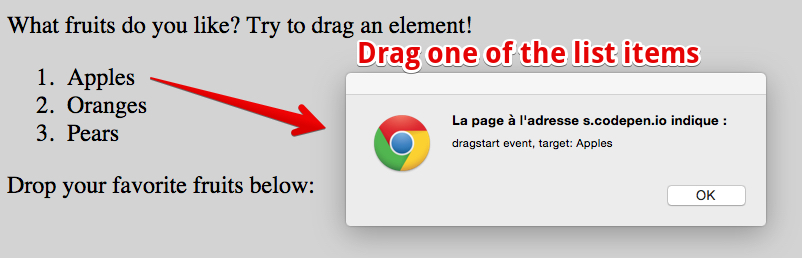
Try the following interactive example in your browser (just click and drag one of the list items) or play with it at CodePen.
Screenshot:
Complete code from the example:
- <!DOCTYPE html>
- <html lang=“en”>
- <head>
- function dragStartHandler(event) {
- alert(‘dragstart event, target: ‘ + event.target.innerHTML);
- }
- </head>
- <body>
- <p>What fruits do you like? Try to drag an element!</p>
- <ol ondragstart=“dragStartHandler(event)“>
- <li draggable=“true” data-value=“fruit-apple”>Apples</li>
- <li draggable=“true” data-value=“fruit-orange”>Oranges</li>
- <li draggable=“true” data-value=“fruit-pear”>Pears</li>
- </ol>
- <p>Drop your favorite fruits below:</p>
- <body>
- <html>
In this script, the event handler will only display an alert showing the name of the target element that launched the event.
https://codepen.io/w3devcampus/embed/MaWKZb?user=w3devcampus&default-tab=result&slug-hash=MaWKZb&theme-id=0&height=496&name=cp_embed_1 HTML game