Drag and drop files to a drop zone, display file details in a list
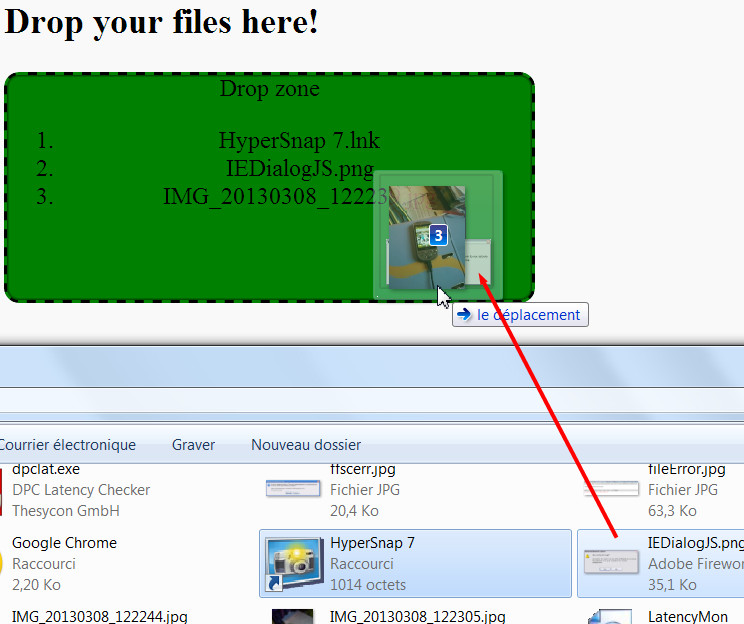
Try the example below directly in your browser (just drag and drop files to the greyish drop zone), or play with it at CodePen:
Complete source code from the example:
- <!DOCTYPE html>
- <html lang=“en”>
- <head>
- <style>
- div {
- height: 150px;
- width: 350px;
- float: left;
- border: 2px solid #666666;
- background–color: #ccc;
- margin–right: 5px;
- border–radius: 10px;
- box–shadow: inset 0 0 3px #000;
- text–align: center;
- cursor: move;
- }
- .dragged {
- border: 2px dashed #000;
- background–color: green;
- }
- .draggedOver {
- border: 2px dashed #000;
- background–color: green;
- }
- </style>
- function dragLeaveHandler(event) {
- console.log(“drag leave”);
- // Set style of drop zone to default
- event.target.classList.remove(‘draggedOver’);
- }
- function dragEnterHandler(event) {
- console.log(“Drag enter”);
- // Show some visual feedback
- event.target.classList.add(‘draggedOver’);
- }
- function dragOverHandler(event) {
- //console.log(“Drag over a droppable zone”);
- // Do not propagate the event
- event.stopPropagation();
- // Prevent default behavior, in particular when we drop images or links
- event.preventDefault();
- }
- function dropHandler(event) {
- console.log(‘drop event’);
- // Do not propagate the event
- event.stopPropagation();
- // Prevent default behavior, in particular when we drop images or links
- event.preventDefault();
- // reset the visual look of the drop zone to default
- event.target.classList.remove(‘draggedOver’);
- // get the files from the clipboard
- var files = event.dataTransfer.files;
- var filesLen = files.length;
- var filenames = “”;
- // iterate on the files, get details using the file API
- // Display file names in a list.
- for(var i = 0 ; i filesLen ; i++) {
- filenames += ‘\n’ + files[i].name;
- // Create a li, set its value to a file name, add it to the ol
- var li = document.createElement(‘li’);
- li.textContent = files[i].name; document.querySelector(“#droppedFiles”).appendChild(li);
- }
- console.log(files.length + ‘ file(s) have been dropped:\n’ + filenames);
- }
- </head>
- <body>
- <h2>Drop your files here!</h2>
- id=“droppableZone” ondragenter=“dragEnterHandler(event)“ ondrop=“dropHandler(event)“
- ondragover=“dragOverHandler(event)“ ondragleave=“dragLeaveHandler(event)“>
- Drop zone
- id=“droppedFiles”>
- <body>
- <html>
Note that:
- We prevented the browser default behavior in the drop and dragover handlers Otherwise, if we dropped a media file (an image, an audio of video file), the browser would try to display/play it in a new window/tab. We also stop the propagation for performance reasons, because when we drag an object it can raise many events within the parents of the drop zone element as well.
- Lines 73-74 create a <li> element. Its value is initialized with the file name of the current file in the collection, and added to the <ol> list.
In principle, this example is very similar to the “fruit” examples we worked through earlier, except that this time we’re working with files. And when we work with files, it is important to prevent the browser’s default behavior.
 HTML game