Uploading files using XMLHttpRequest level 2 (XHR2)
This time, let us mash-up a couple of examples. Let’s combine the upload of files using XHR2, with progress monitoring (we worked on in the 3.2 lectures) with one of our drag and drop examples. To achieve this, we re-use the method called uploadAllFilesUsingAjax() and add a <progress> element to the drag and drop example.
example
Try this interactive example at JSBin (this example does not work on CodePen. We are using a fake remote server and it cancels the connection as soon as we try to connect):
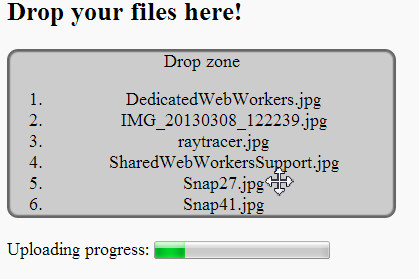
Source code extract (we omitted the CSS):
- <!DOCTYPE html>
- <html>
- <head>
- <style>
- …
- </style>
- function dragLeaveHandler(event) {
- console.log(“drag leave”);
- // Set style of drop zone to default
- event.target.classList.remove(‘draggedOver’);
- }
- function dragEnterHandler(event) {
- console.log(“Drag enter”);
- // Show some visual feedback
- event.target.classList.add(‘draggedOver’);
- }
- function dragOverHandler(event) {
- //console.log(“Drag over a droppable zone”);
- // Do not propagate the event
- event.stopPropagation();
- // Prevent default behavior, in particular when we drop images
- // or links
- event.preventDefault();
- }
- function dropHandler(event) {
- console.log(‘drop event’);
- // Do not propagate the event
- event.stopPropagation();
- // Prevent default behavior, in particular when we drop images
- // or links
- event.preventDefault();
- // reset the visual look of the drop zone to default
- event.target.classList.remove(‘draggedOver’);
- // get the files from the clipboard
- var files = event.dataTransfer.files;
- var filesLen = files.length;
- var filenames = “”;
- // iterate on the files, get details using the file API
- // Display file names in a list.
- for(var i = 0 ; i filesLen ; i++) {
- filenames += ‘\n’ + files[i].name;
- // Create a li, set its value to a file name, add it to the ol
- var li = document.createElement(‘li’);
- li.textContent = files[i].name;
- document.querySelector(“#droppedFiles”).appendChild(li);
- }
- console.log(files.length + ‘ file(s) have been dropped:\n’
- + filenames);
- uploadAllFilesUsingAjax(files);
- }
- function uploadAllFilesUsingAjax(files) {
- var xhr = new XMLHttpRequest();
- xhr.open(‘POST’, ‘upload.html’);
- xhr.upload.onprogress = function(e) {
- progress.value = e.loaded;
- progress.max = e.total;
- };
- xhr.onload = function() {
- alert(‘Upload complete!’);
- };
- var form = new FormData();
- for(var i = 0 ; i files.length ; i++) {
- form.append(‘file’, files[i]);
- }
- // Send the Ajax request
- xhr.send(form);
- }
- </head>
- <body>
- <h2>Drop your files here!</h2>
- id=“droppableZone” ondragenter=“dragEnterHandler(event)“
- ondrop=“dropHandler(event)“
- ondragover=“dragOverHandler(event)“
- ondragleave=“dragLeaveHandler(event)“>
- Drop zone
- id=“droppedFiles”>
- <br/>
- Uploading progress: <progress id=“progress”></progress>
- <body>
- <html>
We have highlighted the interesting parts in the example!
We build (line 75) an object of type FormData (this comes from the standard JavaScript DOM API level 2), we fill this object with the file contents (line 77), then we send the Ajax request (line 81), and monitor the upload progress (lines 66-69).
Instead of uploading all the files at once, it might be interesting to upload one file at a time with visual feedback, such as: “uploading file MichaelJackson.jpg…..”. We will leave this exercise up to you.
 HTML game