Mixing JSON cue content with track and cue events, makes the synchronization of elements in the HTML document (while the video is playing) much easier.
Example of track event listeners that use JSON cue contents
Here is a small code extract that shows how we can capture the JSON content of a cue when the video reaches its start time. We do this within a cuechange listener attached to a TextTrack:
- textTrack.oncuechange = function (){
- // “this” is the textTrack that fired the event.
- // Let’s get the first active cue for this time segment
- var cue = this.activeCues[0];
- var obj = JSON.parse(cue.text);
- // do something
- }
Here is a very impressive demo by Sam Dutton that uses JSON cues containing the latitude and longitude of the camera used for filming the video, to synchronize two map views: every time the active cue changes, the Google map and equivalent Google street view are updated.
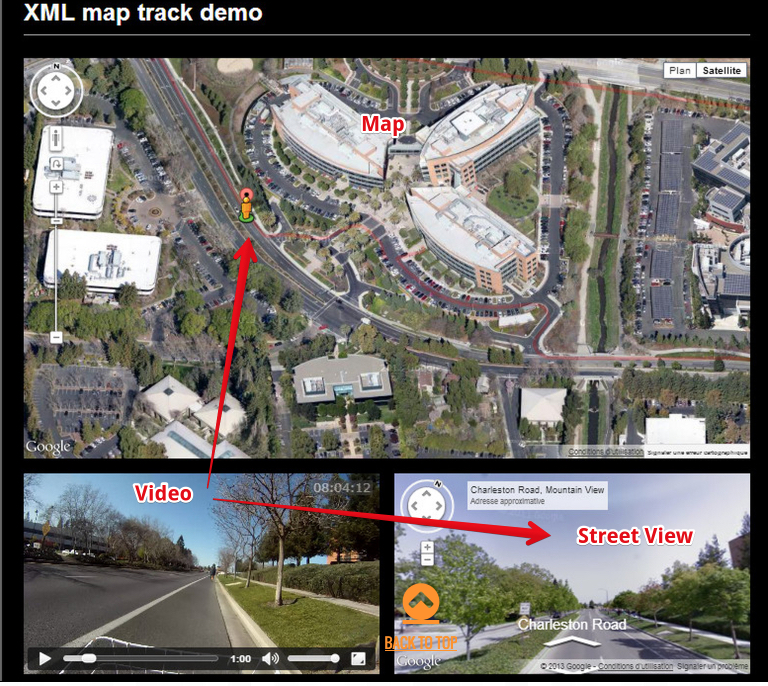
Example of a cue content from this demonstration:
- {“lat”:37.4219276, “lng”:-122.088218, “t”:1331363000}
Cue events and cue content:
We can acquire a cue DOM object using the techniques we have seen previously, or by using the new HTML5 TextTrack getCueById() method.
- var videoElement = document.querySelector(“#myvideo”);
- var textTracks = videoElement.textTracks; // one for each track element
- var textTrack = textTracks[0]; // corresponds to the first track element
- // Get a cue with ID=”wikipedia”
- var cue = textTrack.getCueById(“Wikipedia”);
And once we have a cue object, it is possible to add event listeners to it:
- cue.onenter = function(){
- // display something, play a sound, update any DOM element…
- };
- cue.onexit = function(){
- // do something else
- };
If the getCueById method is not implemented (this is the case in many browsers, as at November 2015), we use the polyfill presented in the previous section:
- // for browsers that do not implement the getCueById() method
- // let’s assume we’re adding the getCueById function to a TextTrack object
- //named “track”
- if (typeof track.getCueById !== “function”) {
- track.getCueById = function(id) {
- var cues = track.cues;
- for (var i = 0; i != track.cues.length; ++i) {
- if (cues[i].id === id) {
- return cues[i];
- }
- }
- };
- }
Example that displays a wikipedia page and a google map while a video is playing
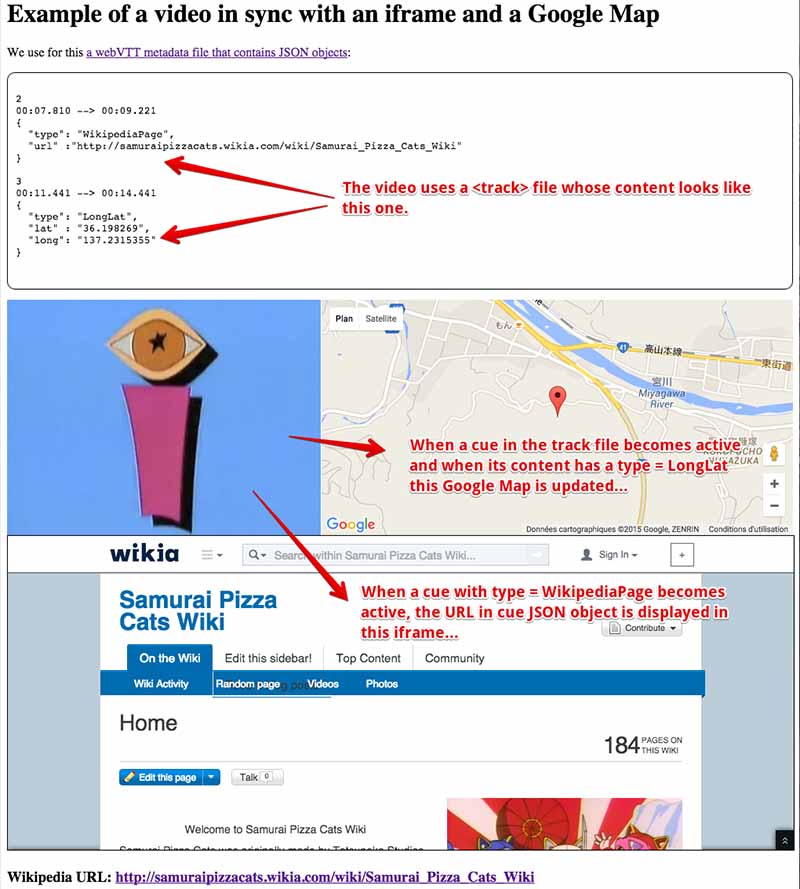
HTML code extract:
- <!DOCTYPE html>
- <html lang=”en”>
- <head>
- <meta charset=”utf-8″>
- <title>Example syncing element of the document with video metadata in webVTT file</title>
- </head>
- <body >
- <main>
- <video id=”myVideo” controls crossorigin=”anonymous” >
- <source src=”https://mainline.i3s.unice.fr/mooc/samuraiPizzacat.mp4″
- type=”video/mp4″>
- …
- </source>
- <track label=”urls track”
- src=”https://…../SamuraiPizzaCat-metadata.vtt”
- kind=”metadata” >
- </track>
- </video>
- </main>
- <aside>
- </aside>
- <h3>Wikipedia URL: <span id=”currentURL”> Non défini </span></h3>
- …
JavaScript code:
- window.onload = function() {
- var videoElement = document.querySelector(“#myVideo”);
- var myIFrame = document.querySelector(“#myIframe”);
- var currentURLSpan = document.querySelector(“#currentURL”);
- var textTracks = videoElement.textTracks; // one for each track element
- var textTrack = textTracks[0]; // corresponds to the first track element
- // change mode so we can use the track
- textTrack.mode = “hidden”;
- // Default position on the google map
- var centerpos = new google.maps.LatLng(48.579400,7.7519);
- // default options for the google map
- var optionsGmaps = {
- center:centerpos,
- navigationControlOptions: {style:
- google.maps.NavigationControlStyle.SMALL},
- mapTypeId: google.maps.MapTypeId.ROADMAP,
- zoom: 15
- };
- // Init map object
- var map = new google.maps.Map(document.getElementById(“map”),
- optionsGmaps);
- // cue change listener, this is where the synchronization between
- // the HTML document and the video is done
- textTrack.oncuechange = function (){
- // we assume that we have no overlapping cues
- var cue = this.activeCues[0];
- if(cue === undefined) return;
- // get cue content as a JavaScript object
- var cueContentJSON = JSON.parse(cue.text);
- // do different things depending on the type of sync (wikipedia, gmap)
- switch(cueContentJSON.type) {
- case’WikipediaPage’:
- var myURL = cueContentJSON.url;
- var myLink = “<a href=\”” + myURL + “\”>” + myURL + “</a>”;
- currentURLSpan.innerHTML = myLink;
- myIFrame.src = myURL; // assign url to src property
- break;
- case ‘LongLat’:
- drawPosition(cueContentJSON.long, cueContentJSON.lat);
- break;
- }
- };
- function drawPosition(long, lat) {
- // Make new object LatLng for Google Maps
- var latlng = new google.maps.LatLng(lat, long);
- // Add a marker at position
- var marker = new google.maps.Marker({
- position: latlng,
- map: map,
- title:”You are here”
- });
- // center map on longitude and latitude
- map.panTo(latlng);
- }
- };
All the critical work is done by the cuechange event listener, lines 27-50. We have only the one track, so we set its mode to “hidden” (line 10) in order to be sure that it will be loaded, and that playing the video will fire cuechange events on it. The rest is just Google map code and classic DOM manipulation for updating HTML content (a span that will display the current URL, line 42).
 HTML game