Listening for events
cuechange TextTrack events, enter and exit cue events
Instead of reading the whole content of a track at once, like in the previous example, it might be interesting to process the track content cue by cue, while the video is being played. For example, you choose which track you want – say, German subtitles – and you want to display the subtitles in sync with the video, below the video, with your own style and animations… Or you display the entire set of subtitles to the side of the video and you want to highlight the current one… For this, you can listen for different sorts of events.
The two types of cue event are:
- enter and exit events fired for cues, (not supported by all browsers as at October 2015).
- cuechange events fired for TextTrack objects (good support).
Example of cuechange listener on TextTrack:
- // track is a loaded TextTrack
- track.addEventListener(“cuechange”, function(e) {
- var cue = this.activeCues[0];
- console.log(“cue change”);
- // do something with the current cue
- });
In the above example, let’s assume that we have no overlapping cues for the current time segment. The above code listens for cue change events: when the video is being played, the time counter increases. And when this time counter value reaches time segments defined by one or more cues, the callback is called. The list of cues that are in the current time segments are in this.activeCues; where this represents the track that fired the event.
In the following lessons, we show how to deal with overlapping cues (cases where we have more than one active cue).
Example of enter and exit event listeners on a TRACK’S cues:
- // iterate on all cues of the current track
- var cues = track.cues;
- for(var i=0, len = cues.length; i < len; i++) {
- // current cue, also add enter and exit listeners to it
- var cue = cues[i];
- addCueListeners(cue);
- …
- }
- function addCueListeners(cue) {
- cue.onenter = function(){
- console.log(‘enter cue id=’ + this.id);
- // do something
- };
- cue.onexit = function(){
- console.log(‘exit cue id=’ + cue.id);
- // do something else
- };
- } // end of addCueListeners…
showing real examples of event listeners
Here is an example at JSBin that shows how to listen for cuechange events:
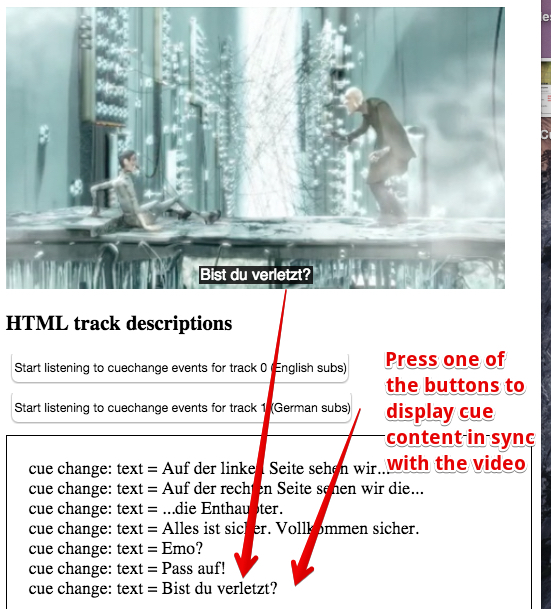
Source code extract:
- function readContent(track) {
- console.log(“adding cue change listener to loaded track…”);
- trackStatusesDiv.innerHTML = “”;
- // add a cue change listener to the TextTrack
- track.addEventListener(“cuechange”, function(e) {
- var cue = this.activeCues[0];
- if(cue !== undefined)
- trackStatusesDiv.innerHTML += “cue change: text = ” + cue.text + “<br>”;
- });
- video.play();
- }
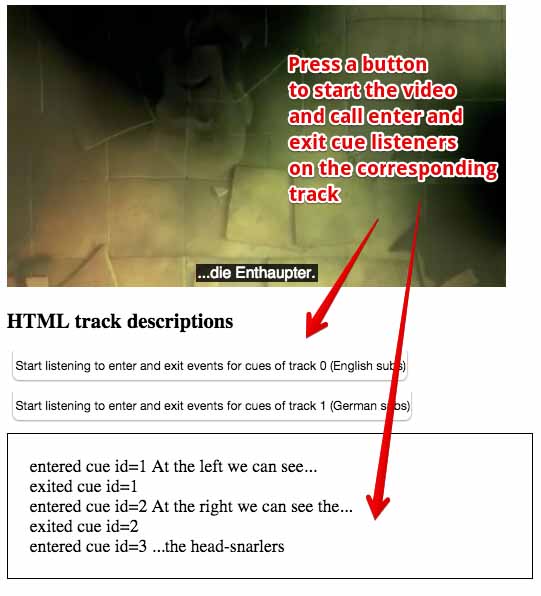
Source code extract:
- function readContent(track) {
- console.log(“adding enter and exit listeners to all cues of this track”);
- trackStatusesDiv.innerHTML = “”;
- // get the list of cues for that track
- var cues = track.cues;
- // iterate on them
- for(var i=0; i < cues.length; i++) {
- // current cue
- var cue = cues[i];
- addCueListeners(cue);
- }
- video.play();
- }
- function addCueListeners(cue) {
- cue.onenter = function(){
- trackStatusesDiv.innerHTML += ‘entered cue id=’ + this.id + ” “
- + this.text + “<br>”;
- };
- cue.onexit = function(){
- trackStatusesDiv.innerHTML += ‘exited cue id=’ + this.id + “<br>”;
- };
- } // end of addCueListeners…
Knowledge check 1.2.5 (not graded)
0 points possible (ungraded)What conditions are necessary for a video to fire events on a particular track?The track must be loaded and the mode property of its TextTrack object must be “hidden” or “showing”. Of course you have to define event listeners too in order to do something interesting.No particular conditions, just add event listeners and you’ll be good.
 HTML game