Introduction
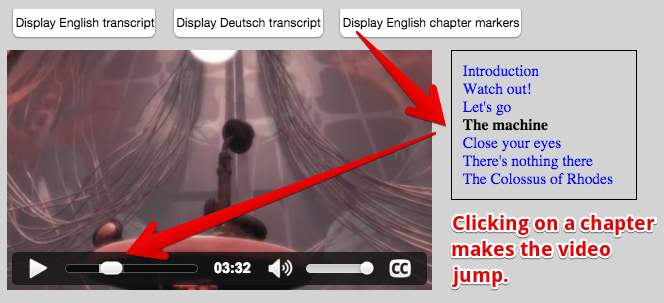
We can use WebVTT files to define chapters. The syntax is exactly the same as for subtitles/caption .vtt files. The only difference is in the declaration of the track. Here is how we declared a chapter track in one of the previous examples (in bold in the example below):
HTML code:
- <video id=”myVideo” preload=”metadata” controls crossOrigin=”anonymous”>
- <source src=”https://…../elephants-dream-medium.mp4″
- type=”video/mp4″>
- <source src=”https://…../elephants-dream-medium.webm”
- type=”video/webm”>
- <track label=”English subtitles”
- kind=”subtitles”
- srclang=”en”
- src=”https://…../elephants-dream-subtitles-en.vtt” >
- <track label=”Deutsch subtitles”
- kind=”subtitles”
- srclang=”de”
- src=”https://…../elephants-dream-subtitles-de.vtt”
- default>
- <track label=”English chapters”
- kind=”chapters”
- srclang=”en”
- src=”https://…../elephants-dream-chapters-en.vtt”>
- </video>
If we try this code in an HTML document, nothing special happens. No magic menu, no extra button!
Currently (July 2016), no browser takes chapter tracks into account. You could use one of the enhanced video players presented during the HTML5 Part 1 course, but as you will see in this lesson: making your own chapter navigation menu is not complicated.
let’s START by examining the SAMPLE .vtt file:
elephant-dream-chapters-en.vtt:
- WEBVTT
- chapter-1
- 00:00:00.000 –> 00:00:26.000
- Introduction
- chapter-2
- 00:00:28.206 –> 00:01:02.000
- Watch out!
- chapter-3
- 00:01:02.034 –> 00:03:10.000
- Let’s go
- chapter-4
- 00:03:10.014 –> 00:05:40.000
- The machine
- chapter-5
- 00:05:41.208 –> 00:07:26.000
- Close your eyes
- chapter-6
- 00:07:27.125 –> 00:08:12.000
- There’s nothing there
- chapter-7
- 00:08:13.000 –> 00:09:07.500
- The Colossus of Rhodes
There are 7 cues (one for each chapter). Each cue id is the word “chapter-” followed by the chapter number, then we have the start and end time of the cue/chapter, and the cue content. In this case: the description of the chapter (“Introduction”, “Watch out!”, “Let’s go”, etc…).
Hmm… let’s try to open this chapter track with the example we wrote in a previous lesson – the one that displayed the clickable transcript for subtitles/captions on the right of the video. We need to modify it a little bit:
- We add a “show English chapters” button with a click event listener similar to this :
- <button disabled id=”buttonEnglishChapters” onclick=”loadTranscript(‘en’, ‘chapters’);”>
- Display English chapter markers
- </button>
- We modify the loadTranscript function from the previous example, so that it matches both the srclang and the kind attribute of the track.
Here is a new version: in bold are the source code lines we modified.- function loadTranscript(lang, kind) {
- …
- // Locate the track with lang and kind that match the parameters
- for(var i = 0; i < tracks.length; i++) {
- …
- if((track.language === lang) && (track.kind === kind)) {
- // display it contents…
- }
- }
- }
simple approach: chapters as clickable text on the right of the video
Try it on JSBin; this version includes the modifications we presented earlier – nothing more. Notice that we kept the existing buttons to display a clickable transcript:
Look at the JavaScript and HTML tab of the JSBin example to see the source code. It’s the same as in the clickable transcript example, except for the small changes we explained earlier.
Chapter navigation, illustrated in the video player below, is fairly popular.
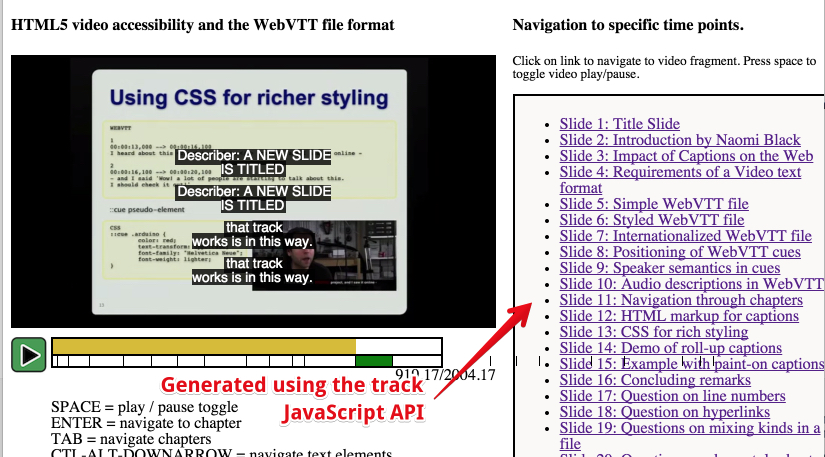
In addition to the clickable chapter list, this one displays an enhanced progress bar created using a canvas. The small squares are drawn corresponding to the chapter cues’ start and end times. You could modify the code provided, in order to add such an enhanced progress indicator.
However, we will see how we can do better by using JSON objects as cue contents. This will be the topic of the next two lessons!
 HTML game