Example 2: showing video description while playing, listening to events, changing the mode of a track
Each track has a mode property (and a mode attribute) that can be: “disabled”, “hidden” or “showing”. More than one track at a time can be in any of these states. The difference between “hidden” and “disabled” is that hidden tracks can fire events (more on that at the end of the first example) whereas disabled tracks do not fire events.
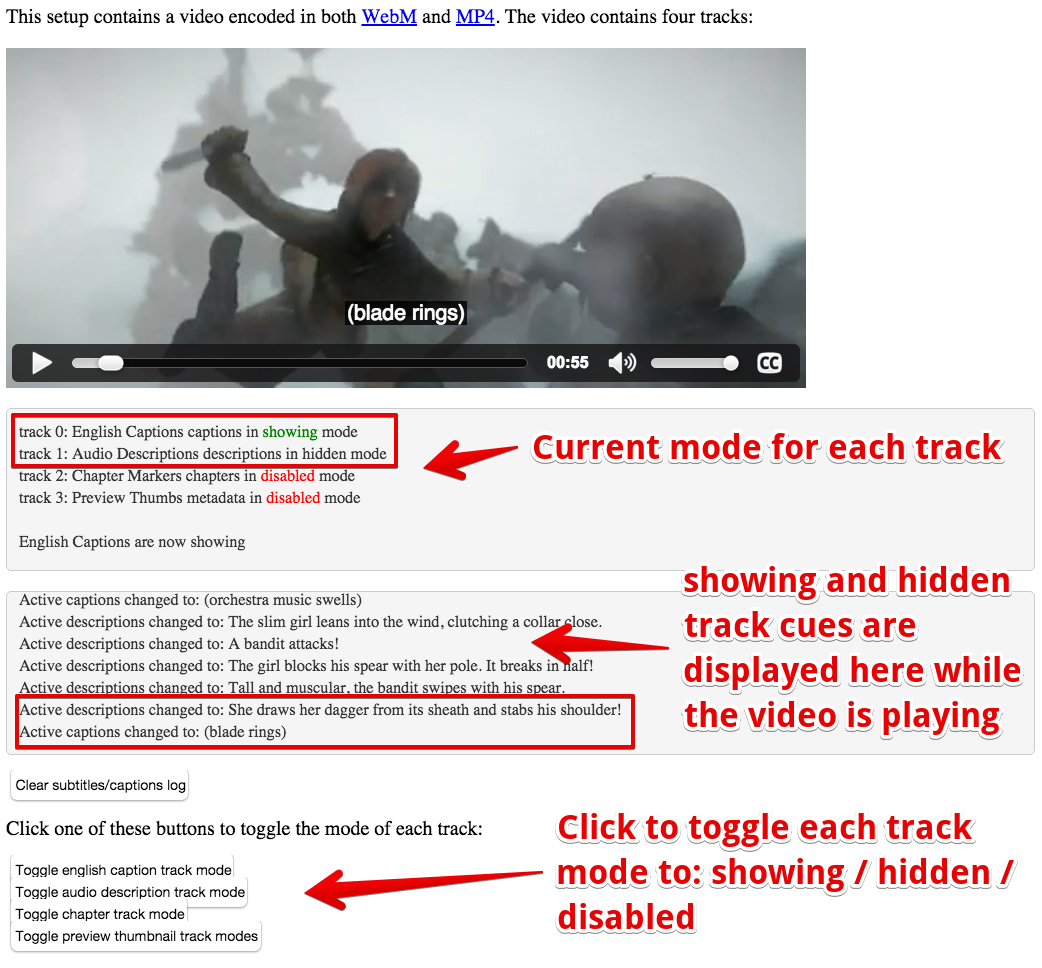
Here is an example at JSBin that shows the use of the mode property, and how to listen for cue events in order to capture the current subtitle/caption from JavaScript. You can change the mode of each track in the video element by clicking on its button. This will toggle the mode of that track. All tracks with mode=”showing” or mode=”hidden” will have the content of their cues displayed in real time in a small area below the video.
In the screen-capture below, we have a WebVTT file displaying a scene’s captions and descriptions.
Extract from HTML code:
- <html lang=”en”>
- …
- <body onload=”init();”>
- …
- <p>
- <video id=”myVideo” preload=”metadata”
- poster =”https://…../sintel.jpg”
- crossorigin=”anonymous”
- controls=”controls”
- width=”640″ height=”272″>
- <source src=”https://…../sintel.mp4″
- type=”video/mp4″ />
- <source src=”https://…../sintel.webm”
- type=”video/webm” />
- <track src=”https://…../sintel-captions.vtt”
- kind=”captions”
- label=”English Captions”
- default/>
- <track src=”https://…../sintel-descriptions.vtt”
- kind=”descriptions”
- label=”Audio Descriptions” />
- <track src=”https://…../sintel-chapters.vtt”
- kind=”chapters”
- label=”Chapter Markers” />
- <track src=”https://…../sintel-thumbs.vtt”
- kind=”metadata”
- label=”Preview Thumbs” />
- </video>
- </p>
- <p>
- <p>
- <p>
- </p>
- <p>
- <button onclick=”clearSubtitlesCaptions();”>
- Clear subtitles/captions log
- </button>
- </p>
- <p>Click one of these buttons to toggle the mode of each track:</p>
- <button onclick=”toggleTrack(0);”>
- Toggle english caption track mode
- </button>
- <br>
- <button onclick=”toggleTrack(1);”>
- Toggle audio description track mode
- </button>
- <br>
- <button onclick=”toggleTrack(2);”>
- Toggle chapter track mode
- </button>
- <br>
- <button onclick=”toggleTrack(3);”>
- Toggle preview thumbnail track modes
- </button>
- </body>
- </html>
JavaScript code:
- var tracks, video, statusDiv, subtitlesCaptionsDiv;
- function init() {
- video = document.querySelector(“#myVideo”);
- statusDiv = document.querySelector(“#currentTrackStatuses”);
- subtitlesCaptionsDiv = document.querySelector(“#subtitlesCaptions”);
- tracks = document.querySelectorAll(“track”);
- video.addEventListener(‘loadedmetadata’, function() {
- console.log(“metadata loaded”);
- // defines cue listeners for the active track; we can do this only after the video metadata have been loaded
- for(var i=0; i<tracks.length; i++) {
- var t = tracks[i].track;
- if(t.mode === “showing”) {
- t.addEventListener(‘cuechange’, logCue, false);
- }
- }
- // display in a div the list of tracks and their status/mode value
- displayTrackStatus();
- });
- }
- function displayTrackStatus() {
- // display the status / mode value of each track.
- // In red if disabled, in green if showing
- for(var i=0; i<tracks.length; i++) {
- var t = tracks[i].track;
- var mode = t.mode;
- if(mode === “disabled”) {
- mode = “<span style=’color:red’>” + t.mode + “</span>”;
- } else if(mode === “showing”) {
- mode = “<span style=’color:green’>” + t.mode + “</span>”;
- }
- appendToScrollableDiv(statusDiv, “track ” + i + “: ” + t.label
- + ” ” + t.kind+” in “
- + mode + ” mode”);
- }
- }
- function appendToScrollableDiv(div, text) {
- // we’ve got two scrollable divs. This function
- // appends text to the div passed as a parameter
- // The div is scrollable (thanks to CSS overflow:auto)
- var inner = div.innerHTML;
- div.innerHTML = inner + text + “<br/>”;
- // Make it display the last line appended
- div.scrollTop = div.scrollHeight;
- }
- function clearDiv(div) {
- div.innerHTML = ”;
- }
- function clearSubtitlesCaptions() {
- clearDiv(subtitlesCaptionsDiv);
- }
- function toggleTrack(i) {
- // toggles the mode of track i, removes the cue listener
- // if its mode becomes “disabled”
- // adds a cue listener if its mode was “disabled”
- // and becomes “hidden”
- var t = tracks[i].track;
- switch (t.mode) {
- case “disabled”:
- t.addEventListener(‘cuechange’, logCue, false);
- t.mode = “hidden”;
- break;
- case “hidden”:
- t.mode = “showing”;
- break;
- case “showing”:
- t.removeEventListener(‘cuechange’, logCue, false);
- t.mode = “disabled”;
- break;
- }
- // updates the status
- clearDiv(statusDiv);
- displayTrackStatus();
- appendToScrollableDiv(statusDiv,”<br>” + t.label+” are now ” +t.mode);
- }
- function logCue() {
- // callback for the cue event
- if(this.activeCues && this.activeCues.length) {
- var t = this.activeCues[0].text; // text of current cue
- appendToScrollableDiv(subtitlesCaptionsDiv, “Active “
- + this.kind + ” changed to: ” + t);
- }
- }
 HTML game