Example 1: a video player with clickable transcript – reading WebVTT file content at once
A few words about the set of five examples presented in this chapter: the code of the examples is larger than usual, but each example integrates blocks of code already presented and detailed in the previous lessons.
Creating an accessible player with a clickable transcript of the video presentation
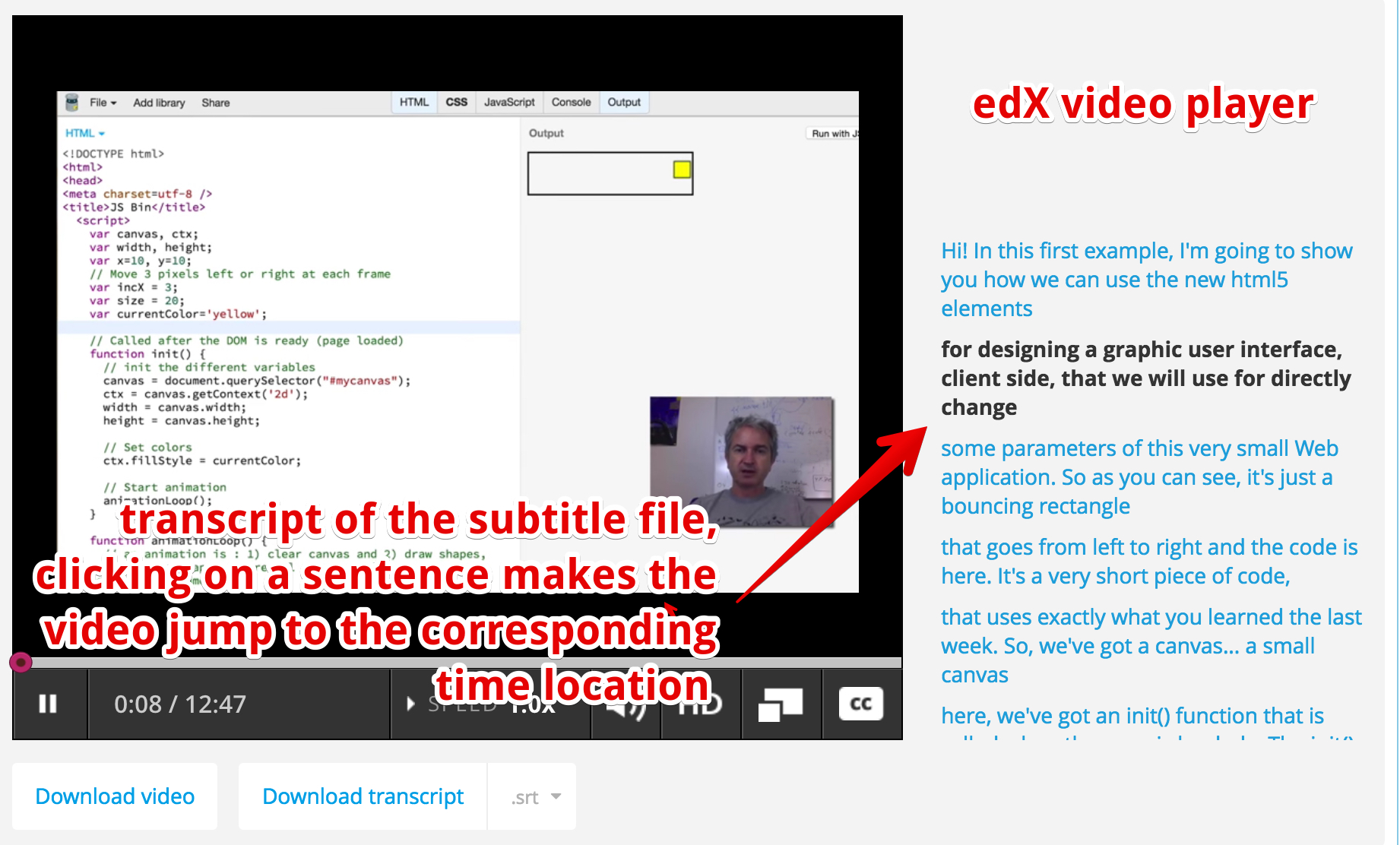
It might be interesting to read the content of a track before playing the video. This is what the edX video player does: it reads a single subtitle file and displays it as a transcript on the right. In the transcript, you can click on a sentence to make the video jump to the corresponding location. We will learn how to do this using the track API.
Example 1: read the webvtt file at once using the track api and make a clickable transcript
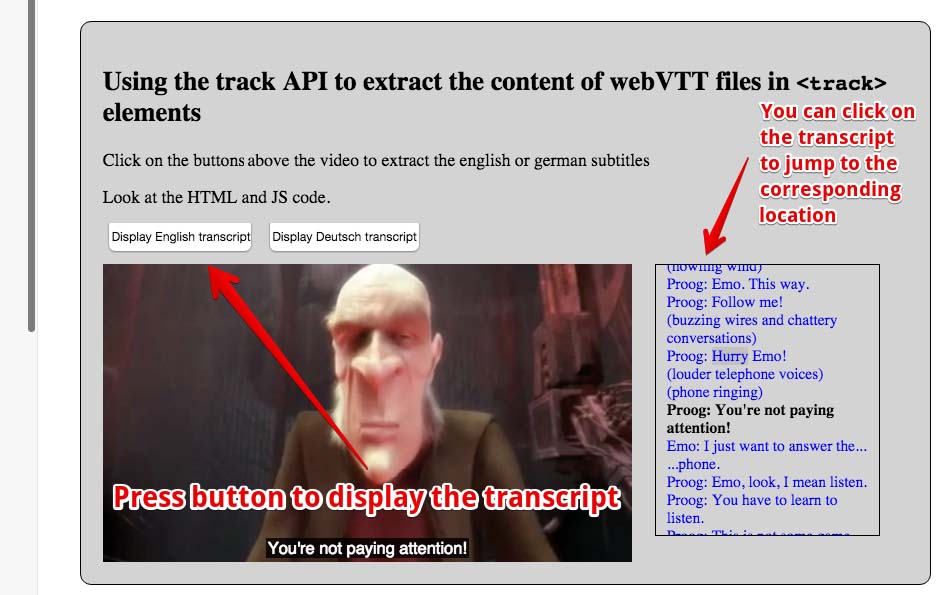
Here we decided to code something similar, except that we will offer a choice of track/subtitle language. Our example offers English or German subtitles, and also another track that contains the chapter descriptions (more on that later). Using a button to select a language (track), the appropriate transcript is displayed on the right. Like the edX player, we can click on any sentence in order to force the video to jump to the corresponding location. While the video is playing, the current text is highlighted.
Some important things here:
- Browsers do not load all the tracks at the same time, and the way they decide when and which track to load differs from one browser to another. So, when we click on a button to choose the track to display, we need to enforce the loading of the track, if it has not been loaded yet.
- When a track file is loaded, then we iterate on the different cues and generate the transcript as a set of <li>…</li> elements. One <li>per cue/sentence.
- We define the id attribute of the <li> to be the same as the cue.id value. In this way, when we click on a <li> we can get its id and find the corresponding cue start time, and make the video jump to that time location.
- We add an enter and an exit listener to each cue. These will be useful for highlighting the current cue. Note that these listeners are not yet supported by FireFox (you can use a cuechange event listener on a TextTrack instead – the source code for FireFox is commented in the example).
HTML code:
- <section id=”all”>
- <button disabled id=”buttonEnglish”
- onclick=”loadTranscript(‘en’);“>
- Display English transcript
- </button>
- <button disabled id=”buttonDeutsch”
- onclick=”loadTranscript(‘de’);“>
- Display Deutsch transcript
- </button>
- </p>
- <video id=”myVideo” preload=”metadata” controls crossOrigin=”anonymous”>
- <source src=”https://…../elephants-dream-medium.mp4″
- type=”video/mp4″>
- <source src=”https://…../elephants-dream-medium.webm”
- type=”video/webm”>
- <track label=”English subtitles”
- kind=”subtitles”
- srclang=”en”
- src=”https://…../elephants-dream-subtitles-en.vtt” >
- <track label=”Deutsch subtitles”
- kind=”subtitles”
- srclang=”de”
- src=”https://…../elephants-dream-subtitles-de.vtt”
- default>
- <track label=”English chapters”
- kind=”chapters”
- srclang=”en”
- src=”https://…../elephants-dream-chapters-en.vtt”>
- </video>
- </section>
CSS code:
- #all {
- background-color: lightgrey;
- border-radius:10px;
- padding: 20px;
- border:1px solid;
- display:inline-block;
- margin:30px;
- width:90%;
- }
- .cues {
- color:blue;
- }
- .cues:hover {
- text-decoration: underline;
- }
- .cues.current {
- color:black;
- font-weight: bold;
- }
- #myVideo {
- display: block;
- float : left;
- margin-right: 3%;
- width: 66%;
- background-color: black;
- position: relative;
- }
- #transcript {
- padding: 10px;
- border:1px solid;
- float: left;
- max-height: 225px;
- overflow: auto;
- width: 25%;
- margin: 0;
- font-size: 14px;
- list-style: none;
- }
JavaScript code:
- var video, transcriptDiv;
- // TextTracks, html tracks, urls of tracks
- var tracks, trackElems, tracksURLs = [];
- var buttonEnglish, buttonDeutsch;
- window.onload = function() {
- console.log(“init”);
- // when the page is loaded, get the different DOM nodes
- // we’re going to work with
- video = document.querySelector(“#myVideo”);
- transcriptDiv = document.querySelector(“#transcript”);
- // The tracks as HTML elements
- trackElems = document.querySelectorAll(“track”);
- // Get the URLs of the vtt files
- for(var i = 0; i < trackElems.length; i++) {
- var currentTrackElem = trackElems[i];
- tracksURLs[i] = currentTrackElem.src;
- }
- buttonEnglish = document.querySelector(“#buttonEnglish”);
- buttonDeutsch = document.querySelector(“#buttonDeutsch”);
- // we enable the buttons only in this load callback,
- // we cannot click before the video is in the DOM
- buttonEnglish.disabled = false;
- buttonDeutsch.disabled = false;
- // The tracks as TextTrack JS objects
- tracks = video.textTracks;
- };
- function loadTranscript(lang) {
- // Called when a button is clicked
- // clear current transcript
- clearTranscriptDiv();
- // set all track modes to disabled. We will only activate the
- // one whose content will be displayed as transcript
- disableAllTracks();
- // Locate the track with language = lang
- for(var i = 0; i < tracks.length; i++) {
- // current track
- var track = tracks[i];
- var trackAsHtmlElem = trackElems[i];
- // Only subtitles/captions are ok for this example…
- if((track.language === lang) && (track.kind !== “chapters”)) {
- track.mode=”showing”;
- if(trackAsHtmlElem.readyState === 2) {
- // the track has already been loaded
- displayCues(track);
- } else {
- displayCuesAfterTrackLoaded(trackAsHtmlElem, track);
- }
- /* Fallback for FireFox that still does not implement cue enter and exit events
- track.addEventListener(“cuechange”, function(e) {
- var cue = this.activeCues[0];
- console.log(“cue change”);
- var transcriptText = document.getElementById(cue.id);
- transcriptText.classList.add(“current”);
- });
- */
- }
- }
- }
- function displayCuesAfterTrackLoaded(trackElem, track) {
- // Create a listener that will only be called once the track has
- // been loaded. We cannot display the transcript before
- // the track is loaded
- trackElem.addEventListener(‘load’, function(e) {
- console.log(“track loaded”);
- displayCues(track);
- });
- }
- function disableAllTracks() {
- for(var i = 0; i < tracks.length; i++)
- // the track mode is important: disabled tracks do not fire events
- tracks[i].mode = “disabled”;
- }
- function displayCues(track) {
- // displays the transcript of a TextTrack
- var cues = track.cues;
- // iterate on all cues of the current track
- for(var i=0, len = cues.length; i < len; i++) {
- // current cue, also add enter and exit listeners to it
- var cue = cues[i];
- addCueListeners(cue);
- // Test if the cue content is a voice <v speaker>….</v>
- var voices = getVoices(cue.text);
- var transText=””;
- if (voices.length > 0) {
- for (var j = 0; j < voices.length; j++) { // how many voices?
- transText += voices[j].voice + ‘: ‘ + removeHTML(voices[j].text);
- }
- } else
- transText = cue.text; // not a voice text
- var clickableTransText = “<li class=’cues’ id=” + cue.id
- + ” onclick=’jumpTo(“
- + cue.startTime + “);'” + “>”
- + transText + “</li>”;
- addToTranscriptDiv(clickableTransText);
- }
- }
- function getVoices(speech) {
- // takes a text content and check if there are voices
- var voices = []; // inside
- var pos = speech.indexOf(‘<v’); // voices are like <v Michel> ….
- while (pos != -1) {
- endVoice = speech.indexOf(‘>’);
- var voice = speech.substring(pos + 2, endVoice).trim();
- var endSpeech = speech.indexOf(‘</v>’);
- var text = speech.substring(endVoice + 1, endSpeech);
- voices.push({
- ‘voice’: voice,
- ‘text’: text
- });
- speech = speech.substring(endSpeech + 4);
- pos = speech.indexOf(‘<v’);
- }
- return voices;
- }
- function removeHTML(text) {
- var div = document.createElement(‘div’);
- div.innerHTML = text;
- return div.textContent || div.innerText || ”;
- }
- function jumpTo(time) {
- // Make the video jump at the time position + force play
- // if it was not playing
- video.currentTime = time;
- video.play();
- }
- function clearTranscriptDiv() {
- transcriptDiv.innerHTML = “”;
- }
- function addToTranscriptDiv(htmlText) {
- transcriptDiv.innerHTML += htmlText;
- }
- function addCueListeners(cue) {
- cue.onenter = function(){
- // Highlight current cue transcript by adding the
- // cue.current CSS class
- console.log(‘enter id=’ + this.id);
- var transcriptText = document.getElementById(this.id);
- transcriptText.classList.add(“current”);
- };
- cue.onexit = function(){
- console.log(‘exit id=’ + cue.id);
- var transcriptText = document.getElementById(this.id);
- transcriptText.classList.remove(“current”);
- };
- } // end of addCueListeners…
Example 2: LOAD a WebVTT file using Ajax/XHR2 and parse it manually
This is an old example written in 2012 at a time when the track API was not supported by browsers. It downloads WebVTT files using Ajax and parses it “by hand”. Notice the complexity of the code, compared to example 1 that uses the track API instead. We give this example as is. Sometimes, bypassing all APIs can be a valuable solution, especially when support for the track API is sporadic, as was the case in 2012…
Here is an example at JSBin that displays the values of the cues in the different tracks:
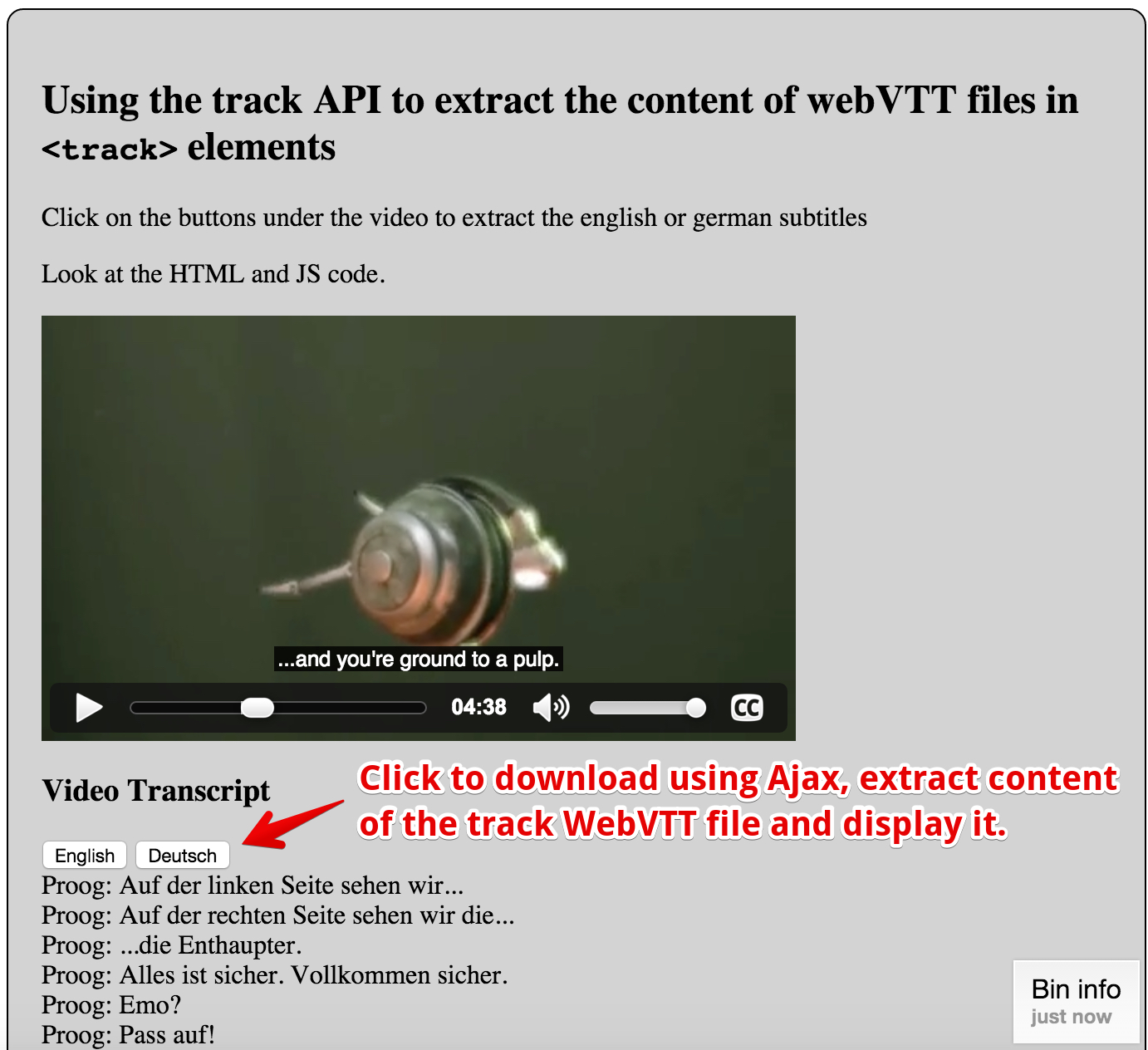
This example, adapted from an example from (now offline) dev.opera.com, uses some JavaScript code that takes a WebVTT subtitle (or caption) file as an argument, parses it, and displays the text on screen, in an element with an id of transcript.
Extract from HTML code:
- …
- <video preload=”metadata” controls >
- <source src=”https://…./elephants-dream-medium.mp4″ type=”video/mp4″>
- <source src=”https://…./elephants-dream-medium.webm” type=”video/webm”>
- <track label=”English subtitles” kind=”subtitles” srclang=”en”
- src=”https://…./elephants-dream-subtitles-en.vtt” default>
- <track label=”Deutsch subtitles” kind=”subtitles” srclang=”de”
- src=”https://…./elephants-dream-subtitles-de.vtt”>
- <track label=”English chapters” kind=”chapters” srclang=”en”
- src=”https://…./elephants-dream-chapters-en.vtt”>
- </video>
- …
- <h3>Video Transcript</h3>
- <button onclick=”loadTranscript(‘en’);”>English</button>
- <button onclick=”loadTranscript(‘de’);”>Deutsch</button>
- </div>
- …
JavaScript code:
- // Transcript.js, by dev.opera.com
- function loadTranscript(lang) {
- var url = “http://mainline.i3s.unice.fr/mooc/” +
- ‘elephants-dream-subtitles-‘ + lang + ‘.vtt’;
- // Will download using Ajax + extract subtitles/captions
- loadTranscriptFile(url);
- }
- function loadTranscriptFile(webvttFileUrl) {
- // Using Ajax/XHR2 (explained in detail in Week 3)
- var reqTrans = new XMLHttpRequest();
- reqTrans.open(‘GET’, webvttFileUrl);
- // callback, called only once the response is ready
- reqTrans.onload = function(e) {
- var pattern = /^([0-9]+)$/;
- var patternTimecode = /^([0-9]{2}:[0-9]{2}:[0-9]{2}[,.]{1}[0-9]{3}) –\> ([0-9]
- {2}:[0-9]{2}:[0-9]{2}[,.]{1}[0-9]{3})(.*)$/;
- var content = this.response; // content of the webVTT file
- var lines = content.split(/\r?\n/); // Get an array of text lines
- var transcript = ”;
- for (i = 0; i < lines.length; i++) {
- var identifier = pattern.exec(lines[i]);
- // is there an id for this line, if it is, go to next line
- if (identifier) {
- i++;
- var timecode = patternTimecode.exec(lines[i]);
- // is the current line a timecode?
- if (timecode && i < lines.length) {
- // if it is go to next line
- i++;
- // it can only be a text line now
- var text = lines[i];
- // is the text multiline?
- while (lines[i] !== ” && i < lines.length) {
- text = text + ‘\n’ + lines[i];
- i++;
- }
- var transText = ”;
- var voices = getVoices(text);
- // is the extracted text multi voices ?
- if (voices.length > 0) {
- // how many voices ?
- for (var j = 0; j < voices.length; j++) {
- transText += voices[j].voice + ‘: ‘
- + removeHTML(voices[j].text)
- + ‘<br />’;
- }
- } else
- // not a voice text
- transText = removeHTML(text) + ‘<br />’;
- transcript += transText;
- }
- }
- var oTrans = document.getElementById(‘transcript’);
- oTrans.innerHTML = transcript;
- }
- };
- reqTrans.send(); // send the Ajax request
- }
- function getVoices(speech) { // takes a text content and check if there are voices
- var voices = []; // inside
- var pos = speech.indexOf(‘<v’); // voices are like <v Michel> ….
- while (pos != -1) {
- endVoice = speech.indexOf(‘>’);
- var voice = speech.substring(pos + 2, endVoice).trim();
- var endSpeech = speech.indexOf(‘</v>’);
- var text = speech.substring(endVoice + 1, endSpeech);
- voices.push({
- ‘voice’: voice,
- ‘text’: text
- });
- speech = speech.substring(endSpeech + 4);
- pos = speech.indexOf(‘<v’);
- }
- return voices;
- }
- function removeHTML(text) {
- var div = document.createElement(‘div’);
- div.innerHTML = text;
- return div.textContent || div.innerText || ”;
- }
 HTML game